mysql 使用 mysqldump 產生的 .sql 檔案, 要匯入到 mssql 之中, 由於匯出的資料量太大, 直接轉換 mysql sql command 為 mssql sql command, 如果使用 SSMS(SQL Server Management Studio) 會遇到記憶體不足的問題.
透過 sqlcmd 匯入資料庫 (不經過 SSMS):
sqlcmd -S localhost -d %db_name% -E -i %output_file%這個也會遇到很多奇奇怪怪的問題, 明明在 SSMS 執行正常的 table, 在 sqlcmd 會遇到重覆插入 PK 值.
最佳解法是透過下列的python script 進行 export, 這是整合了「逐行讀取」、「自動切分 1000 筆」、「停用約束」以及修正後語法的完整版本:
import re
import pyodbc
import argparse
import sys

def parse_value(val_str):
    """Parse a single SQL value string and return a Python value."""
    val_str = val_str.strip()
    if val_str.upper() == 'NULL':
        return None
    if (val_str.startswith("'") and val_str.endswith("'")):
        # Remove surrounding quotes
        inner = val_str[1:-1]
        # Unescape MySQL-style escape sequences
        result = []
        i = 0
        while i < len(inner):
            if inner[i] == '\\' and i + 1 < len(inner):
                next_char = inner[i + 1]
                if next_char == "'":
                    result.append("'")
                elif next_char == "\\":
                    result.append("\\")
                elif next_char == "n":
                    result.append("\n")
                elif next_char == "r":
                    result.append("\r")
                elif next_char == "t":
                    result.append("\t")
                elif next_char == "0":
                    result.append("\0")
                elif next_char == "%":
                    result.append("%")
                elif next_char == "_":
                    result.append("_")
                else:
                    result.append(next_char)
                i += 2
            elif inner[i] == "'" and i + 1 < len(inner) and inner[i + 1] == "'":
                # SQL-style escaped quote
                result.append("'")
                i += 2
            else:
                result.append(inner[i])
                i += 1
        return "".join(result)
    # Try numeric
    try:
        if '.' in val_str:
            return float(val_str)
        return int(val_str)
    except ValueError:
        return val_str

def split_row_values(row_str):
    """Split a single row '(val1, val2, ...)' into individual values."""
    # Remove outer parentheses
    inner = row_str.strip()
    if inner.startswith('('):
        inner = inner[1:]
    if inner.endswith(')'):
        inner = inner[:-1]

    values = []
    current = []
    in_string = False
    i = 0

    while i < len(inner):
        char = inner[i]

        if in_string:
            if char == '\\' and i + 1 < len(inner):
                current.append(char)
                current.append(inner[i + 1])
                i += 2
                continue
            elif char == "'":
                # Check for escaped quote ''
                if i + 1 < len(inner) and inner[i + 1] == "'":
                    current.append(char)
                    current.append(inner[i + 1])
                    i += 2
                    continue
                else:
                    in_string = False
                    current.append(char)
            else:
                current.append(char)
        else:
            if char == "'":
                in_string = True
                current.append(char)
            elif char == ',':
                values.append("".join(current).strip())
                current = []
            else:
                current.append(char)
        i += 1

    if current:
        values.append("".join(current).strip())

    return values

def split_values_robust(values_str):
    """Split VALUES (...),(...),... into individual row strings."""
    rows = []
    buffer = []
    paren_depth = 0
    in_string = False
    i = 0
    length = len(values_str)

    while i < length:
        char = values_str[i]

        if in_string:
            if char == "\\" and i + 1 < length:
                buffer.append(char)
                buffer.append(values_str[i + 1])
                i += 2
                continue
            elif char == "'":
                # Check for '' escape
                if i + 1 < length and values_str[i + 1] == "'":
                    buffer.append(char)
                    buffer.append(values_str[i + 1])
                    i += 2
                    continue
                in_string = False
                buffer.append(char)
            else:
                buffer.append(char)
        else:
            if char == "'":
                in_string = True
                buffer.append(char)
            elif char == "(":
                paren_depth += 1
                buffer.append(char)
            elif char == ")":
                paren_depth -= 1
                buffer.append(char)
                if paren_depth == 0:
                    rows.append("".join(buffer).strip())
                    buffer = []
            elif char == "," and paren_depth == 0:
                pass
            else:
                if paren_depth > 0:
                    buffer.append(char)
        i += 1
    return rows

def run_import(input_file):
    # 資料庫連線配置
    conn_config = {
        "DRIVER": "{ODBC Driver 18 for SQL Server}",
        "SERVER": "127.0.0.1",
        "DATABASE": "你的資料庫名稱",
        "UID": "帳號",
        "PWD": "密碼",
        "Encrypt": "yes",
        "TrustServerCertificate": "yes"
    }

    conn_str = ";".join([f"{k}={v}" for k, v in conn_config.items()])

    try:
        conn = pyodbc.connect(conn_str, autocommit=False)
        cursor = conn.cursor()
        print(f"檔案讀取中: {input_file}")
    except Exception as e:
        print(f"連線失敗: {e}")
        return

    try:
        with open(input_file, 'r', encoding='utf-8') as f:
            sql_content = f.read()
    except Exception as e:
        print(f"讀檔失敗: {e}")
        return

    # Handle INSERT INTO with parameterized queries
    insert_pattern = re.compile(
        r"INSERT INTO\s+`?([\w_]+)`?\s*(?:\((.*?)\))?\s*VALUES\s*(.+?);",
        re.S | re.I
    )

    truncated_tables = set()  # Track tables already truncated
    table_stats = {}  # Track cumulative success/error counts per table

    for match in insert_pattern.finditer(sql_content):
        table_name = match.group(1)
        cols_raw = match.group(2) if match.group(2) else ""
        raw_values = match.group(3)

        # Build column clause
        if cols_raw:
            col_names = [c.strip().replace('`', '') for c in cols_raw.split(',')]
            columns_clause = "([" + "],[".join(col_names) + "])"
        else:
            # No column list in SQL dump — fetch from MSSQL metadata
            # This is required when IDENTITY_INSERT is ON
            try:
                cursor.execute("""
                    SELECT COLUMN_NAME FROM INFORMATION_SCHEMA.COLUMNS
                    WHERE TABLE_NAME = ?
                    ORDER BY ORDINAL_POSITION
                """, table_name)
                db_cols = [row[0] for row in cursor.fetchall()]
                if db_cols:
                    columns_clause = "([" + "],[".join(db_cols) + "])"
                else:
                    columns_clause = ""
            except:
                columns_clause = ""

        print(f"正在處理: {table_name}")

        # Truncate table before inserting (only once per table)
        if table_name not in truncated_tables:
            try:
                cursor.execute(f"TRUNCATE TABLE [{table_name}]")
                conn.commit()
                print(f"  已清空資料表: {table_name}")
            except Exception as e:
                conn.rollback()
                # TRUNCATE fails if there are foreign key constraints, fallback to DELETE
                try:
                    cursor.execute(f"DELETE FROM [{table_name}]")
                    conn.commit()
                    print(f"  已清空資料表 (DELETE): {table_name}")
                except Exception as e2:
                    conn.rollback()
                    print(f"  清空資料表失敗: {table_name}: {e2}")
            truncated_tables.add(table_name)

        all_rows = split_values_robust(raw_values)
        print(f"  共 {len(all_rows)} 筆資料")

        success_count = 0
        error_count = 0

        # Check if table has IDENTITY column, if so enable IDENTITY_INSERT
        has_identity = False
        try:
            cursor.execute(f"""
                SELECT COUNT(*) FROM sys.identity_columns
                WHERE OBJECT_NAME(object_id) = ?
            """, table_name)
            row = cursor.fetchone()
            if row and row[0] > 0:
                has_identity = True
        except:
            pass

        if has_identity:
            try:
                cursor.execute(f"SET IDENTITY_INSERT [{table_name}] ON")
            except Exception as e:
                print(f"  無法開啟 IDENTITY_INSERT: {e}")

        for idx, row_str in enumerate(all_rows):
            raw_vals = split_row_values(row_str)
            parsed_vals = [parse_value(v) for v in raw_vals]

            placeholders = ",".join(["?" for _ in parsed_vals])
            sql = f"INSERT INTO [{table_name}] {columns_clause} VALUES ({placeholders})"

            try:
                cursor.execute(sql, parsed_vals)
                conn.commit()
                success_count += 1
            except Exception as e:
                conn.rollback()
                error_count += 1
                if error_count <= 3:
                    print(f"  跳過錯誤列 {idx}: {e}")
                    # Print the values for debugging
                    preview_vals = [str(v)[:50] if v is not None else 'NULL' for v in parsed_vals]
                    print(f"  值預覽: {preview_vals}")
                elif error_count == 4:
                    print(f"  (後續錯誤將不再顯示...)")

        if has_identity:
            try:
                cursor.execute(f"SET IDENTITY_INSERT [{table_name}] OFF")
            except:
                pass

        # Accumulate stats per table
        if table_name not in table_stats:
            table_stats[table_name] = {"success": 0, "error": 0}
        table_stats[table_name]["success"] += success_count
        table_stats[table_name]["error"] += error_count
        print(f"  本批: 成功 {success_count} 筆, 失敗 {error_count} 筆")

    # Print summary for tables with multiple INSERT batches
    print("\n=== 匯入摘要 ===")
    for tbl, stats in table_stats.items():
        print(f"  {tbl}: 成功 {stats['success']} 筆, 失敗 {stats['error']} 筆")

    cursor.close()
    conn.close()
    print("全部完成。")

if __name__ == "__main__":
    parser = argparse.ArgumentParser(description="MariaDB To MSSQL Migration Tool")
    parser.add_argument("input", help="Path to the .sql dump file")
    args = parser.parse_args()

    run_import(args.input)
如果執行過程中遇到記憶體不足的問題,通常是因為 split_values 處理了單一極其巨大的 INSERT 字串。若發生此情況,請告訴我,我們可以改用生成器(Generator)模式來進一步優化字串解析。
上面這個版本針對一般情況是可以使用,針對特定的資料庫欄位類型(例如 Blob 或特殊的日期格式)則需要再進一步的轉換處理。
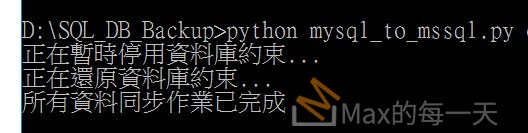
執行結果: