要阻擋這種掃描,最有效的方法是從 Referer(來源網址) 下手,因為日誌顯示這些惡意請求都偽裝成從 binance.com 過來的。雖然你的伺服器目前已經禁止了目錄列表(顯示為 AH01276 錯誤),但阻擋請求可以進一步節省系統資源。
apache 的 log:
[Sun Jan 25 21:23:17.555354 2026] [autoindex:error] [pid 7395:tid 7395] [client 172.68.242.115:11609] AH01276: Cannot serve directory /var/www/html/wp-admin/css/: No matching DirectoryIndex (index.html,index.cgi,index.pl,index.php,index.xhtml,index.htm) found, and server-generated directory index forbidden by Options directive, referer: binance.com
方法一:透過 .htaccess 阻擋特定 Referer
請將以下設定加入到你的 /var/www/html/.htaccess 檔案最上方。這會讓所有來自 binance.com 的請求直接被伺服器拒絕,連目錄檢查的程序都不會執行。
RewriteEngine on
RewriteCond %{HTTP_REFERER} binance\.com [NC]
RewriteRule .* - [F]
- RewriteCond: 檢查來源網址是否包含
binance.com。[NC]代表不區分大小寫。 - RewriteRule: 對於符合條件的請求,回傳
[F](Forbidden,即 403 錯誤)。
方法二:利用 Cloudflare 阻擋 (更推薦)
從日誌的 IP 172.68.242.115 來看,這是 Cloudflare 的 IP。這代表攻擊流量是經過 Cloudflare 才到你的伺服器。直接在伺服器端阻擋雖然有用,但流量還是會進到你的主機。
最好的做法是在 Cloudflare 控制面板 設定防護:
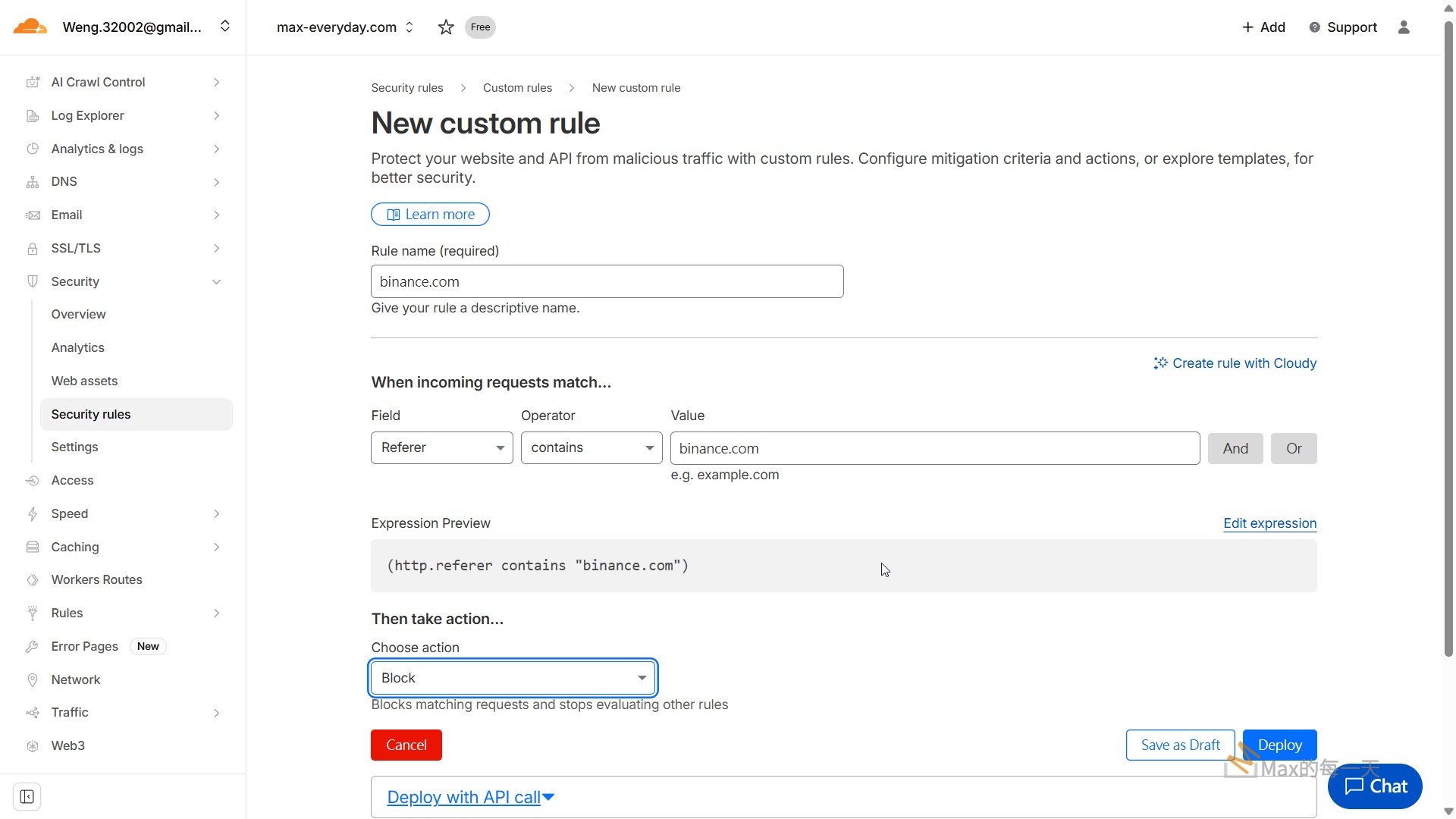
- 進入 Security (安全性) -> WAF -> Create rule (建立規則)。
- 欄位選擇 Referer,運算子選擇 contains,值輸入
binance.com。 - Action 選擇 Block。
這樣在流量到達你的主機之前就會被攔截,徹底釋放你的 Apache Worker。
方法三:禁止存取所有敏感目錄的 PHP 檔案
為了防止機器人以後換個來源網址繼續掃描,你可以針對 wp-admin 和 wp-includes 的內容加強防護。在 /var/www/html/.htaccess 中加入:
# 禁止直接存取 wp-includes 下的 PHP 檔案
<IfModule mod_rewrite.c>
    RewriteEngine On
    RewriteBase /
    RewriteRule ^wp-admin/includes/ - [F,L]
    RewriteRule !^wp-includes/ - [S=3]
    RewriteRule ^wp-includes/[^/]+\.php$ - [F,L]
    RewriteRule ^wp-includes/js/tinymce/langs/.+\.php - [F,L]
    RewriteRule ^wp-includes/theme-compat/ - [F,L]
</IfModule>
總結
建議優先執行 方法一 或 方法二,因為這能針對你日誌中看到的 binance.com 掃描進行精準打擊。
設定完成後,原本日誌中的 autoindex:error 應該會變成普通的 access_compat:error 或直接消失。
我建議將安全攔截規則放在 .htaccess 的最上方,確保這些惡意請求在進入快取邏輯(WP Fastest Cache)之前就被擋掉。這樣可以節省後續的比對運算與磁碟檢查。
以下是合併後的建議設定碼,我將安全防護規則(封鎖 XML-RPC、特定的 binance.com 來源、以及隱藏目錄列表)整合在你的快取規則之前:
# 1. 隱藏目錄檔案列表
Options -Indexes

# 2. 封鎖 XML-RPC (防止暴力破解)
<Files xmlrpc.php>
    <IfModule mod_authz_core.c>
        Require all denied
    </IfModule>
    <IfModule !mod_authz_core.c>
        Order deny,allow
        Deny from all
    </IfModule>
</Files>

# 3. 封鎖特定惡意來源與 Referer
<IfModule mod_rewrite.c>
    RewriteEngine On
    RewriteBase /

    # 阻擋來自 binance.com 的惡意掃描
    RewriteCond %{HTTP_REFERER} binance\.com [NC]
    RewriteRule .* - [F,L]

    # 4. 原有的 WP Fastest Cache 規則開始
    RewriteCond %{HTTPS} =on
    RewriteCond %{HTTP_HOST} ^max-everyday.com
    # Start WPFC Exclude
    # End WPFC Exclude
    # Start_WPFC_Exclude_Admin_Cookie
    RewriteCond %{HTTP:Cookie} !wordpress_logged_in_[^\=]+\=max-everyday-root
    # End_WPFC_Exclude_Admin_Cookie
    RewriteCond %{HTTP_HOST} ^max-everyday.com
    RewriteCond %{HTTP_USER_AGENT} !(facebookexternalhit|WP_FASTEST_CACHE_CSS_VALIDATOR|Twitterbot|LinkedInBot|WhatsApp|Mediapartners-Google)
    RewriteCond %{HTTP_USER_AGENT} !(WP\sFastest\sCache\sPreload(\siPhone\sMobile)?\s*Bot)
    RewriteCond %{REQUEST_METHOD} !POST
    RewriteCond %{REQUEST_URI} !(\/){2,}
    RewriteCond %{THE_REQUEST} !(\/){2,}
    RewriteCond %{REQUEST_URI} \/$
    RewriteCond %{QUERY_STRING} !.+
    RewriteCond %{HTTP:Cookie} !comment_author_
    RewriteCond %{HTTP:Profile} !^[a-z0-9\"]+ [NC]
    RewriteCond %{DOCUMENT_ROOT}/wp-content/cache/all/$1/index.html -f [or]
    RewriteCond /var/www/html/wp-content/cache/all/$1/index.html -f
    RewriteRule ^(.*) "/wp-content/cache/all/$1/index.html" [L]
</IfModule>
調整重點說明
第一,我把 Options -Indexes 放在最前面,這能直接解決你日誌中大量的 AH01276 錯誤,不再讓機器人看到你的目錄內容。
第二,xmlrpc.php 的封鎖使用了 <Files> 標籤,這比 RewriteRule 更底層且有效,能直接阻斷這類型的暴力破解嘗試。
第三,在快取規則開始前,先用 RewriteCond %{HTTP_REFERER} binance\.com [NC] 進行過濾。這樣只要來源是那個網站,伺服器會立即回傳 403 Forbidden 並停止處理後續規則,這對減輕伺服器負擔非常有幫助。
設定完後,你可以再次觀察 error.log。原本來自 binance.com 的錯誤應該會從目錄掃描錯誤變成單純的 client denied。